
There are three ways into Sourcing by HappyCo: existing HappyCo customers sign in with their HappyCo login, companies new to HappyCo sign up, and external vendors register on Vendor Connect.
Pick the path that matches you to start using Sourcing's competitive bidding tools in a few minutes.
 In this article
- Before you sign in as an existing HappyCo customer
- Sign in to Sourcing as an existing HappyCo customer
- How HappyCo sign-in works (FusionAuth)
- Sign up for Sourcing as a new customer
- Create a new Sourcing account
- Register as a vendor on Vendor Connect
- Complete the Vendor Connect registration wizard
- Frequently asked questions
| If you are… | Start here | What happens |
|---|---|---|
| An existing HappyCo customer | Sign in | Use your existing HappyCo login to go straight to Sourcing, with no separate sign-up. Select "Already have an account? Sign in". If the user isn't yet a HappyCo user in Admin Center, add them as a user first. |
| A procurement or operations team new to HappyCo | Sign up then Create your account | Create a new account and start placing orders |
| An external vendor or supplier | Register on Vendor Connect | Build a company profile and get matched to bid on work |
Before you sign in as an existing HappyCo customer
If your company already uses HappyCo, you don't sign up for Sourcing separately. Sourcing runs on your existing HappyCo account, with the same sign-in you use for HappyCo Manage.
- The user must already be a user in Happy Property Manage.
- Not a HappyCo user yet? An admin must add them as a user in Admin Center first.
Sign in to Sourcing as an existing HappyCo customer
 Select Already have an account? Sign in
On the Sourcing screen, select Already have an account? Sign in.
 Sign in with your HappyCo login
Sign in to Sourcing with your existing HappyCo login.
 Tip
You're taken to auth.happyco.com to sign in, then sent back to Sourcing.
 Enter your email address
 and select Continue.
 Enter your password
. Your dashboard opens.
How HappyCo sign-in works (FusionAuth)
Sign-in is powered by FusionAuth, HappyCo's identity provider and the same system behind HappyCo Manage, so one HappyCo login works across your HappyCo products. When you open the sign-in link you go to auth.happyco.com, then straight back to Sourcing.
Because FusionAuth is shared across HappyCo, your account has to exist there first. That's why anyone who isn't yet a user in Happy Property Manage needs to be added before they can sign in.
 Security
- Sourcing sign-in is handled entirely by FusionAuth, HappyCo's centralised identity provider, which also secures HappyCo Manage.
- Credentials are entered only on auth.happyco.com and are never handled or stored by Sourcing.
- Authentication uses OAuth 2.0 / OpenID Connect with PKCE (SHA-256) and short-lived tokens.
- Every HappyCo product signs in through this single, centrally managed and access-controlled identity.
Can't sign in?
- Never been added as a HappyCo user? You won't be recognised at sign-in yet. Ask your account admin to add you in the Admin Center (see Add and edit users, assign roles, and grant property access), then try again.
- Forgotten your password? Use the Forgot your password? link on the sign-in screen to reset it.
Sign up for Sourcing as a new customer
Self-serve sign-up is for procurement and operations teams whose company is new to HappyCo. It takes a couple of minutes and doesn't require a credit card.
Create a new Sourcing account
Open the sign-up page
Go to procurement.happyco.com/signup.
Enter your details
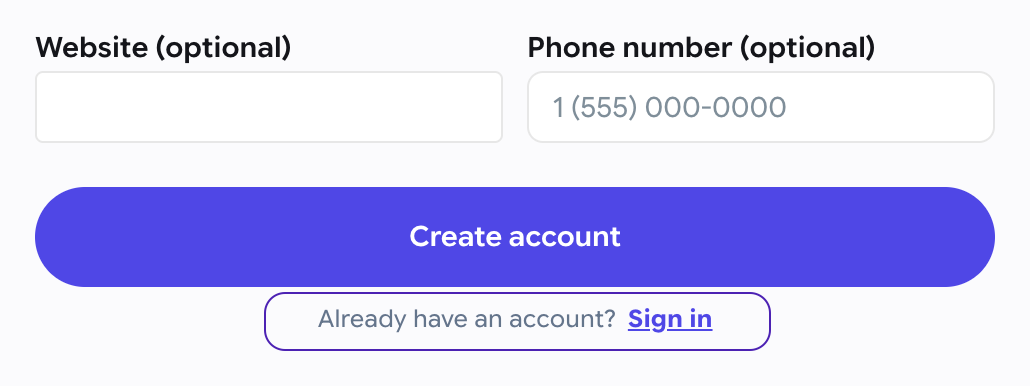
On the Create your account screen, enter your first name, last name, company and work email.
Create a password
Create a password and re-enter it to confirm.
Tip
A phone number is optional.
Create the account
Select Create account.
 Sign in
 with the standard HappyCo sign-in. Follow Sign in to Sourcing as an existing HappyCo customer above.
Already a HappyCo customer?
Don't sign up here. Sign in with your existing HappyCo login instead (see Sign in to Sourcing as an existing HappyCo customer above), and make sure you're already a user in Happy Property Manage.
Register as a vendor on Vendor Connect
Vendors and suppliers join through Vendor Connect to get matched to and bid on work across the network. Registration is a five-step wizard: Account, Company, Trades, Service area and Review.
Complete the Vendor Connect registration wizard
-
Open the registration page
Go to vendors.happyco.com/register. -
Account
Enter your email address and full name, create a password, confirm it, then select Continue. TipPasswords need at least 8 characters.
-
Company
Add your company details. TipYour profile is prefilled from these details.
-
Trades
Select the trades your business offers. -
Service area
Set the areas you cover. -
Review
Check your details and submit your registration.
Compliance documents come later
You add compliance documents when you go to bid, not during registration.
Vendor accounts are separate from customer accounts
Vendors sign in to Vendor Connect as their own users, against trade categories.
Frequently asked questions
Who can sign up for Sourcing?
Self-serve sign-up is for teams whose company is new to HappyCo. Existing HappyCo customers don't sign up. They sign in with their existing HappyCo login.
I'm an existing HappyCo customer. Do I create a new account?
No. Sign in with your existing HappyCo login, because Sourcing uses the same account. Make sure you're a user in Happy Property Manage first.
How do vendors get access?
Vendors register through Vendor Connect at vendors.happyco.com/register and build a company profile across the five-step wizard.
Which sign-in do I use?
The standard HappyCo sign-in, powered by FusionAuth. It's the same login you use for HappyCo Manage. See Sign in to Sourcing as an existing HappyCo customer above.
I have a HappyCo account but the login isn't working.
You may not have been added as a user in Happy Property Manage yet. Ask your admin to add you as a HappyCo user in the Admin Center (see Add and edit users, assign roles, and grant property access), then sign in again.
I forgot my password.
Select Forgot your password? on the sign-in screen to reset it.